Staying in touch
Connections
Everybody you currently stand in a group with, on one page. There is nothing to send and nothing to accept — a connection is a fact about your memberships, computed the moment you ask for it, and it ends the moment the last shared group does.
At a glance
- You do not make a connection. It exists because you and someone else both hold a live membership in the same group.
- There is no request, accept, block or unfollow. Joining and leaving groups is the only lever.
- The list is a readout, not a permission. Nothing on this page grants anything — what a shared group gives you is enforced elsewhere.
- Archiving a group changes nothing here. Its members still count as connections.
- Leaving does. Walking out of the last group you share drops the person off the list on the next load.
How a connection forms
The page asks one question of the database: which other people hold a live membership in a live group that I also hold a live membership in. Everything on the page falls out of that one query — there is no connections table, no edge, and no row anywhere recording that two people know each other.
So a connection is never created and never deleted. It is derived, every time the page is opened, from the memberships as they stand at that moment.
- What makes one
- Both of you holding a live membership in the same group. Nothing else — not a season, not a commitment, not having posted anything.
- What ends one
- Either membership ending, or the group being deleted. Both halves of the pair have to be live for the person to appear.
- Roles are irrelevant
- Admin and member read exactly the same. The query never looks at the role column.
- Counted once
- Sharing four groups with somebody makes them one entry, not four. The four are listed inside their row.
- You are excluded
- Your own membership is what the search starts from, and you are filtered out of its results — you are never your own connection.
What a row says
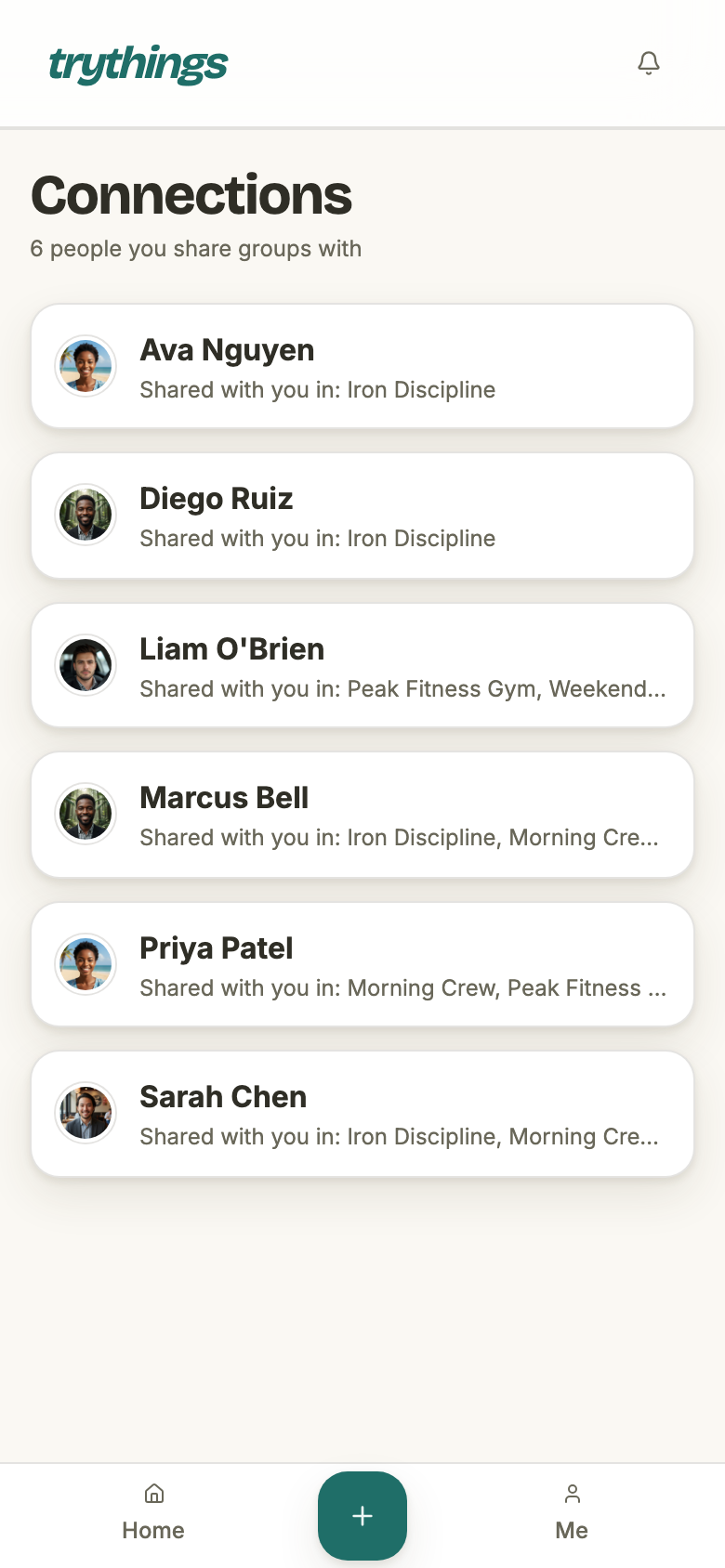
A row is a name, a face, and the groups you meet in. The groups are listed alphabetically and cut off at three; anything past that is counted rather than named, so somebody you share five groups with is written as three names and +2 more instead of a line that wraps five times.
That is what is written. What is read on a phone is shorter, because the line is a single row of text that clips rather than wraps — see below.
- The name
- The display name on their account, as they set it in onboarding or changed it since. Not an email — the connections list never shows one.
- The face
- Their uploaded avatar, re-signed for you on the way out. Failing that, the photo their Google account carried in; failing that, their initials on a colour derived from their name.
- The groups
- Every live group the two of you share, alphabetically, first three named and the rest counted as “+N more” — on one line, which clips at the width it is given.
- The order
- By display name, then by account id to break a tie — so two people with the same name keep a stable position between page loads.
- Not a link
- No row is pressable. There is no member page behind it, no message button and no way to act on a person from here.
What a connection unlocks
Nothing, by itself. This is worth saying plainly because a list of people usually implies a set of powers over them, and here it does not: the page is a window onto co-membership, and co-membership is checked by the things that need it, not by this list.
What sharing a group actually gives you, in the code that gates it:
- The group's own surfaces — its page, its timeline, its seasons, its member roster. Those are gated on your membership of that named group, not on the person.
- Their photos, when a photo belongs to no post. An avatar or a group image has no group of its own to be checked against, so re-signing one falls back to the person-keyed question: have the two of you ever stood in a group together. A photo attached to a proof is gated on that proof's group instead, which is narrower.
- Tagging them on a proof. The tag picker is the member list of the group the season belongs to — so it tracks that one group, not your connections as a whole.
When the shared group goes away
Three things can happen to a group you share, and they do not agree with each other.
Leaving, or being removed
Both doors out of a group do the same thing to the membership: the row is moved into the record of finished stints and deleted outright from the membership table. Nothing is left behind that the connections query could match, so the effect is total rather than partial — on the next load, that group stops joining the two of you at all.
Whether the person disappears depends on what else you share. Lose the only group and they are gone from the list; lose one of four and their row stays with one fewer group named on it.
- Leaving yourself
- Removes every connection that group was carrying alone — the page is computed from your live memberships, so ending one narrows it.
- Being removed
- Identical. An admin putting somebody out and a member walking out differ in who may press the button, not in what the departure leaves.
- When it takes effect
- On the next load of the page. Leaving refreshes the dashboard and the bell and names nothing else, so an already-open connections list keeps showing the group until it is fetched again.
- Rejoining
- A fresh invite and a fresh membership row put the connection straight back. There is no memory of the gap on this page.
Archiving
Nothing at all. Archiving is a shelf rather than a tombstone — an archived group keeps its members, its seasons and its timeline, and exactly one read in the whole app treats the archived flag as a filter (the nightly proof reminder stops nudging). The connections query is not that read, so an archived group still connects the people in it, and still appears by name inside their rows.
Deleting
A deleted group takes its memberships down with it in the same stamp, so everybody it was connecting drops off the list. It is worth knowing how hard that is to reach: the delete cascade is an operator's tool, called directly and never over HTTP. The one delete path the API still answers is a compatibility shim for the 1.0 mobile bundle, and what it actually performs is an archive — so archiving is the only group-level ending anybody using the product can cause, and archiving does nothing to this page.
With nobody in it
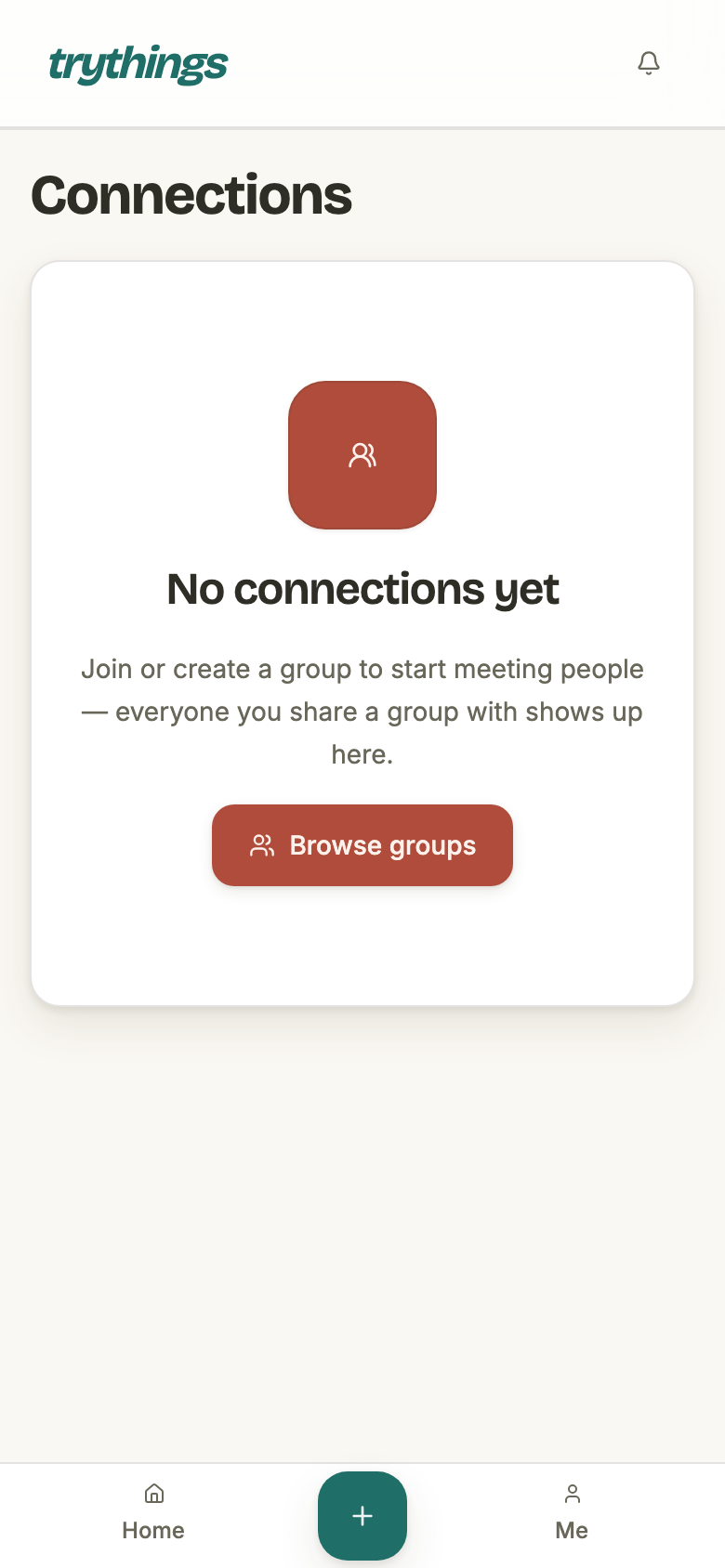
A member who has joined nothing has no connections — the query starts from their memberships and there are none. The page says so, and points at the one thing that would change it.
Paging, and the states around it
The list is paged rather than infinite: twenty people at a time, with Previous and Next under them. The pager is only drawn when there is a second page to reach, so most members never see it at all.
- Page size
- Twenty. Fixed by the page — the endpoint would accept up to a hundred, but nothing in the app asks it to.
- The pager
- Previous / Next with “Page X of Y” between them, drawn only when there is more than one page. The button at the end of the list is disabled rather than hidden.
- The count line
- Under the heading: “6 people you share groups with”, singular at one. It is the total across every page, not the number of rows in front of you.
- While it loads
- Four grey placeholder rows in the shape of the real ones, so the page does not jump when they arrive.
- If it fails
- “Couldn’t load your connections”, the server’s own reason if it gave one, and a Try again button that re-runs the same request.